
Climate

Midea air conditioners
Midea air conditioners on the local network, protocols V2 and V3. V3 units need a token and key, fetched once from Midea's cloud.
What it does
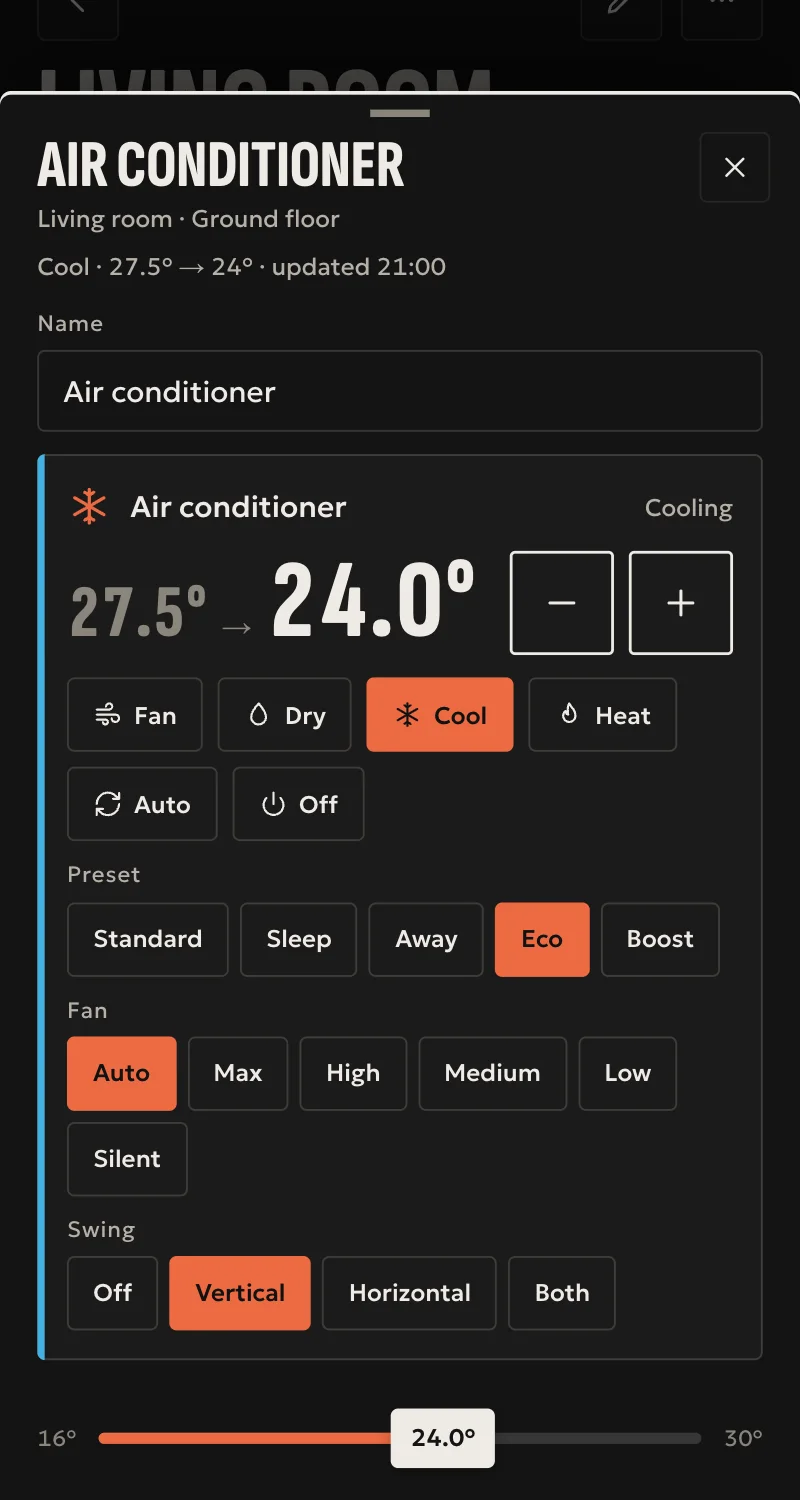
- Power, mode (auto, cool, dry, heat, fan) and target temperature in half degrees, as the unit allows.
- Fan speed, swing and presets (sleep, away, eco, boost), as the unit reports them.
- Indoor and outdoor temperature.
- State refreshed every 15 seconds. Every command is confirmed by reading the unit back.
Worth knowing
- Air conditioners only, not other Midea appliances.
- The V3 token and key depend on Midea's cloud, which fails at times. After that the hub needs no cloud.
- A unit takes about one local connection at a time, so another local controller can clash with Arvio.
- The unit beeps on each command unless SFK turns that off.
Setup guide
Driver: systems.arvio.midea. Local once connected. V3 units need internet and Midea's cloud for one step at install time.
What you need
- The air conditioner on the same network as the hub.
- A fixed address for it. Reserve it in the router.
- Its device id and protocol version (2 or 3).
- For a V3 unit, its token and key. V2 units need neither.
- A laptop on the same network, with internet, for fetching those.
How to connect
If the driver is not in «Προσθήκη συσκευής» (Add device), bring it into the installation first: Marketplace → this driver → «Εισαγωγή σε εγκατάσταση» (Import into installation). Whatever «Εύρεση στο δίκτυο» (Find on the network) finds comes in by itself.
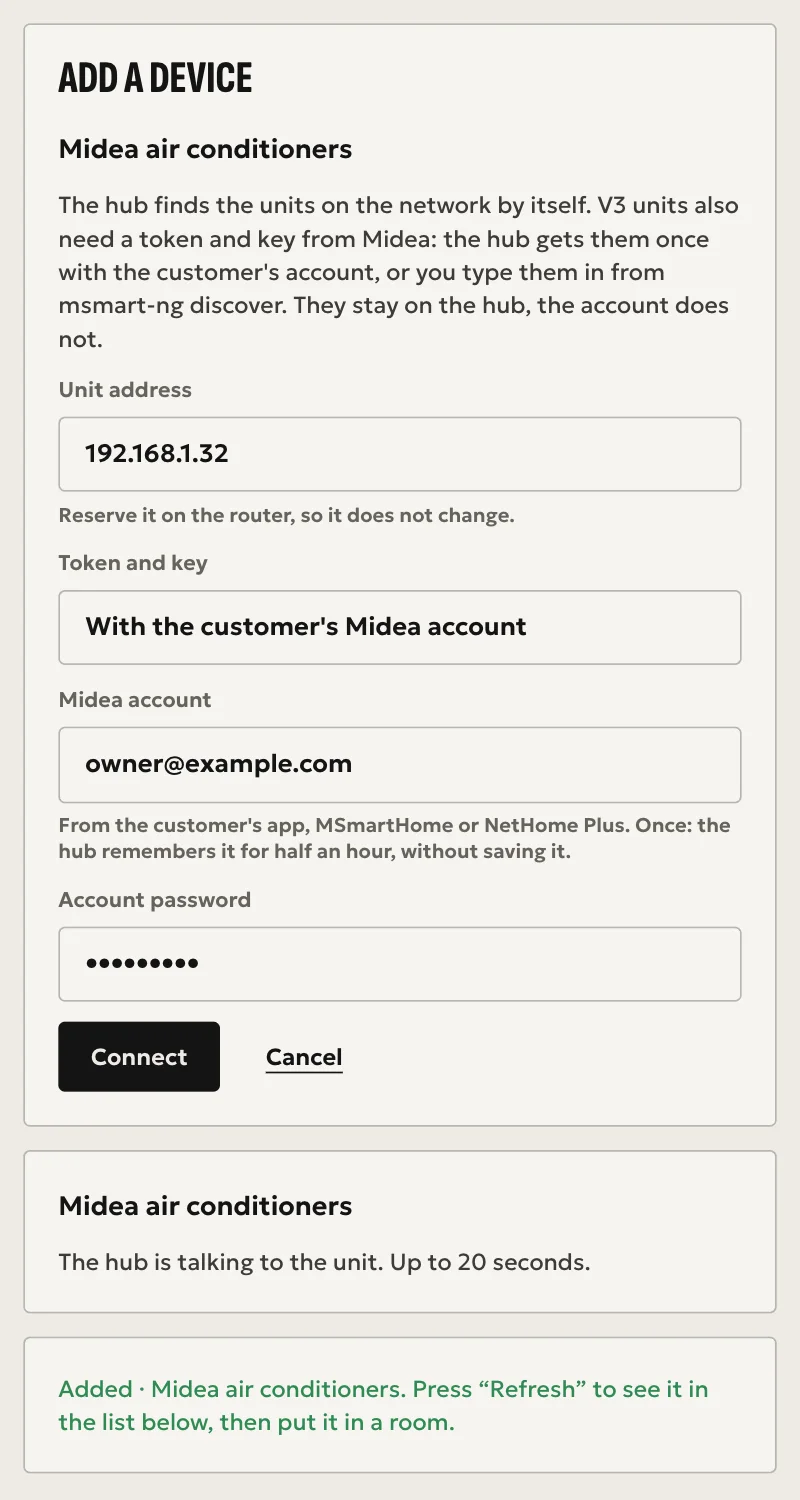
- In Partner, open the hub and go to «Συσκευές» → «Προσθήκη συσκευής», and press «Εύρεση στο δίκτυο» or «Κλιματιστικά Midea».
- Choose the unit it found.
- For a V3 unit, choose «Με τον λογαριασμό Midea του πελάτη» and type the email and password of the customer's app, MSmartHome or NetHome Plus. The hub asks Midea's cloud once. The account is not stored, and the hub remembers it for half an hour so you can add the house's other units.
- Press «Σύνδεση». The hub talks to the unit, for up to 20 seconds.
If the customer would rather not give their account, choose «Θα τα γράψω εγώ»: on your laptop run the free tool msmart-ng, msmart-ng discover <address of the unit>, and type the token and key it gives.
The unit stays on the hub only if it answers and the keys work. Otherwise Partner says why and nothing is saved. When it says «Προστέθηκε» (Added), press «Ανανέωση» (Refresh). The unit appears in the «Συσκευές» list, as one climate control and two temperature readings. Put it in a room from «Δωμάτια» (Rooms).
From then on the hub keeps the token and key and does not need Midea's cloud. They pass through Arvio's cloud only to reach the hub, and are not kept there.
What works
- Power, mode (auto, cool, dry, heat, fan) and target temperature in half degrees, as the unit allows.
- Fan speed, swing and presets (sleep, away, eco, boost), as the unit reports them.
- Indoor and outdoor temperature.
- State refreshed every 15 seconds, and every command confirmed by reading the unit back.
Limits
- Air conditioners only, not other Midea appliances.
- The V3 token and key depend on Midea's cloud, which fails at times.
- A unit takes about one local connection at a time, so another local controller can clash with Arvio.
- The unit beeps on each command unless SFK turns that off.
Troubleshooting
- Partner says the unit does not answer → it is off, the address is wrong, or it is on another network. Correct that and press «Σύνδεση» (Connect) again.
- Partner says the token or key is wrong → fetch them again with msmart-ng and press «Σύνδεση» (Connect) again.
- Partner says the unit did not answer in time → something else may be holding its one local connection. Remove the other local controller and try again.
- «Η Midea δεν δέχτηκε τον λογαριασμό» → check the email and password in the customer's app.
- «Το cloud της Midea δεν έδωσε τα κλειδιά» → check the unit is on that account. If it goes on, try again later or type them from msmart-ng.
- The unit keeps dropping off → something else is holding its one local connection. Remove the other local controller.
- Partner says the hub runs an older version of Arvio Core → the hub needs updating. Ask SFK for it, then try again.